




Product description

See it in action!
The video showcases the product in use.The video guides you through product setup.The video compares multiple products.The video shows the product being unpacked.
 MOUNT-KB01
Sleek Under Desk Keyboard Tray
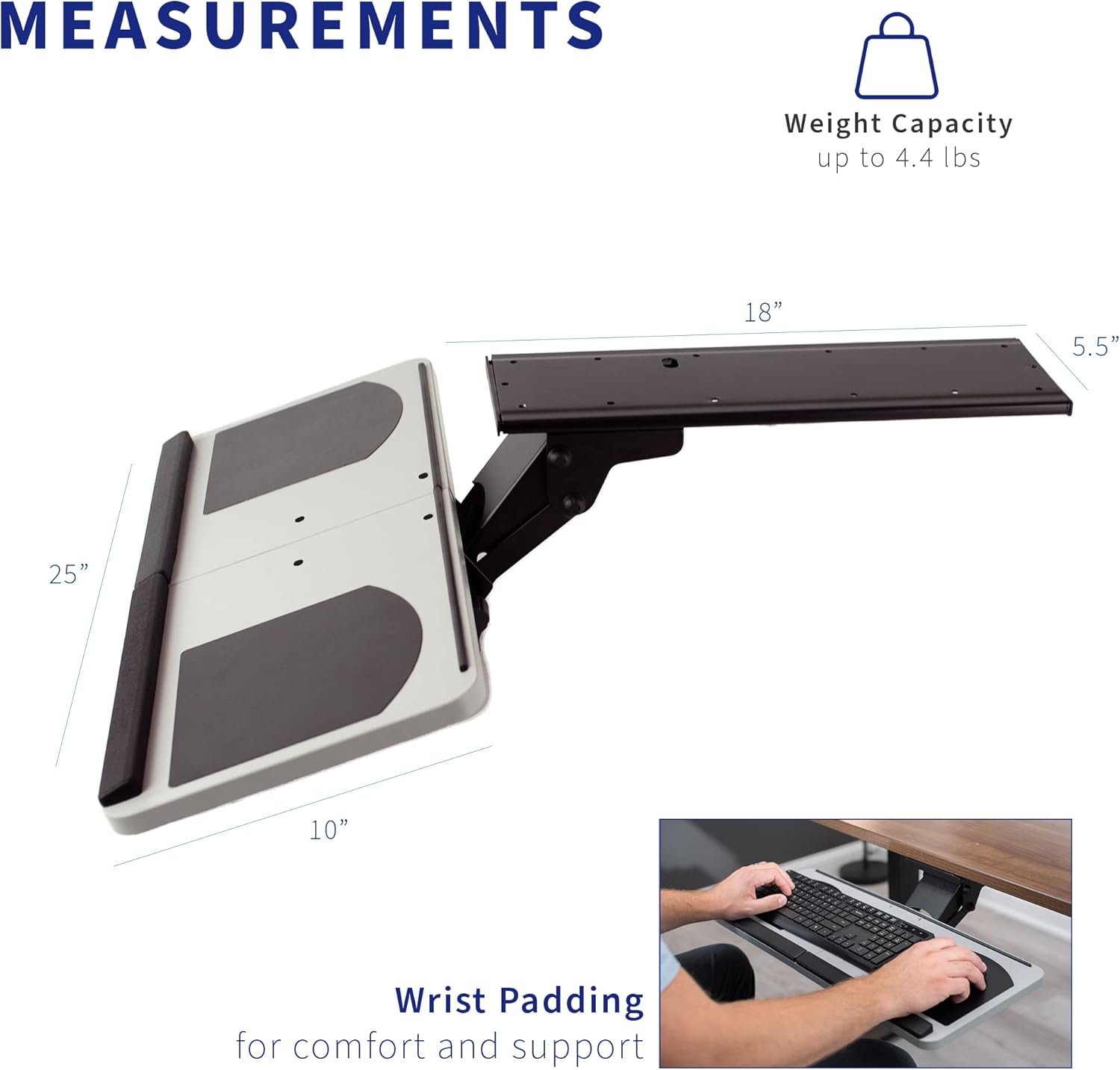
Enhance your typing posture with an ergonomic adjustable keyboard tray that mounts to the underside of your desk. Features include plush wrist padding to help reduce wrist soreness, height adjustment within a 5” range, and full side-to-side rotation for optimal keyboard placement.


1 360°
2 TILT
3 12″ EXTENSION
SPECIFICATIONS
MATERIAL Steel, Particle Board, Padding KEYBOARD TRAY DIMENSIONS 25” x 10” TRACK DIMENSIONS 18” x 5.5” EXTENSION 12″ HEIGHT ADJUSTMENT 5″ TILT +23° to -18° SWIVEL 360° PRODUCT WEIGHT 13 lbs WEIGHT CAPACITY 11 lbs
Other Desk Keyboard Trays
Add to Cart
Add to Cart
Add to Cart
Add to Cart
Customer Reviews
4.1 out of 5 stars 546
4.1 out of 5 stars 2,586
4.1 out of 5 stars 46
4.4 out of 5 stars 12,183
4.2 out of 5 stars 1,562
Price
$69.99$69.99
$59.99$59.99
—
$49.99$49.99
$69.99$69.99
Style
Under Desk Mount
Under Desk Mount
Under Desk Mount
Desk Clamp
Desk Clamp
Tray Dimensions
25″ x 10″
25″ x 10″
25″ x 10″
26.8” x 11”
26.8” x 11”
Split Top
✔
✘
✘
✔
✔
Available Colors
1
5
1
5
4
Height Adjustment
✔
✔
✔
✘
✔
Ergonomic Keyboard and Mouse Tray – Attaches to the underside of your desk for a space-saving setup. The keyboard slides forward and backward on an 18″ track (Be sure to measure the underside of your desk to make sure the 18″ track will fit!).
Typing Comfort – Enhances typing posture and reduces wrist soreness with removable plush padding, a tilting mechanism, 360 swivel, and 5″ of height adjustment.
Deluxe Universal 25″ x 10″ Tray – Weighs 13 lbs and fits most keyboards and mice on the market, letting you customize to your preference.
Simple Assembly Process – All hardware for mounting your tray is provided so you can experience ergonomic typing in no time!
We’ve Got You Covered – This keyboard tray is backed with a limited 3-year Manufacturer Warranty as well as friendly tech support to help with any questions or concerns.




L. M. Crane –
Great price for a quality product
An under desk/counter keyboard holder must be sturdy and easy to adjust to proper position. This one does that very well. Substantial in construction and sized to hold an ergonomic Microsoft keyboard and mouse easily. Can fit mouse on either side of keyboard. Feels very stable. One easily accessible knob to provide all adjustments. Built in wrist rests. This item has solid construction at a decent price compared to competitors.Installation is relatively easy if you have a pencil, drill, and screwdriver (ratchet screwdriver even better). I was lucky in that the underlying plate holding everything to the desk fit the holes of a different manufacturer’s unit under my desk that lasted 15 years before breaking, so I was spared the marking and drilling of the plate holes. Even so, won’t require much in the way of handyman skills.
Tony Jewett –
Beyond my expectations
The reviews I read for this product made it sound like a good deal, but it even outperformed what I was expecting. Since I’m now working from home every day, I needed a tray for the other side of my desk (I have an L-shaped desk, with my personal desktop and monitors on one leg, and my work rig on the other).Opening the box, all the parts were there (in fact, I had one extra screw), and I was immediately impressed. The track and the arm are both sturdy metal, with no plastic, except for the handle on the tensioning rod. The tray itself is also solid, with built-in mouse pads on either end (lefties rejoice). The arm rest is not as spongy as I was expecting, but I don’t normally use them so I don’t really care about that. I may remove it later.I bought a second one because the original tray I had for my personal computer was broken, and I can’t track down appropriate parts. The second one was just as good as quality as the first one, although I didn’t get an extra screw w/ that one.Installation was straightforward, although the instructions were pretty barebones, mostly just a diagram. If you are not normally handy and the instructions aren’t enough for you, the vivo-us.com website has an installation video. One thing I did differently on the second install was to attach the tray to the arm before putting it on the track. If you’ve got a second person to help, I would install the arm first, but since I was alone I found it easier to do it first and not while lying on my back under the desk.One note, if you have a really deep keyboard, like w/ an attached arm rest or something, then your keyboard may hang off the back some. One of my keyboards over hangs the back by roughly half an inch.Once I got it arranged the way I wanted, it felt very natural to type; it doesn’t wobble or anything.All in all, I am very happy with mine, especially for the price. Would definitely recommend.
Bart Hoekstra –
Very sturdy keyboard drawer – up/down and tilt adjustments are good – sliding in and out not as good
This thing is built very solidly – plenty of metal and wood and feels very sturdy. Lots of room for a full-size keyboard and mouse. The rest for your wrists is a little too big for me, so I had to raise my keyboard by putting a board underneath it – I could probably also take the wrist rest off. Installation was pretty easy. The only drawback was the sliding mechanism. Definitely not as smooth as others I have seen that use roller bearings. So if you slide the drawer in and out a lot – then you might want to look elsewhere.
Bob B –
Great product, and CS Team cares, even years later!
For practicality, I give it a 4.5 out of 5. If you’re not used to things under your desk, or you’re not paying attention, the knob and drawer can be painful on the knees. But I adore the inverse tilt and the full width, making it perfect no matter which computer or chair I’m using.For customer service, VIVO’s team has made me a fan for life. I bought this in February 2020. I didn’t get around to opening/installing it until roughly Feb. 2022, because…well…2020.1) I had a lot of difficulty with my first installation, because the support arm was warped and _would_ _not_ go into the track. They sent me a new one, free of charge, despite the two years that had passed since my original purchase. Wow, right?!2) When I had to move cross-country a year later, I uninstalled the fixture so I could take it with me to my next desk. Unfortunately, a lot of seemingly-indestructible items were damaged in the move. I dropped a note to the same nice folks at VIVO, and I asked if I could buy a replacement for the flat keyboard base that had been shattered and torn – yes, both at the same time! (It was both awful and impressive!) They sent me a quick invoice for roughly 25% of what I paid for the full assembly back in 2020, including shipping, and we were good to go. I know very few companies that would bother to do that instead of making the customer purchase the entire setup again.In both installations, I made the following customizations:* I removed the “plush/gel” wrist rest before even starting. It is neither plush nor gel…plus I use a larger keyboard (the Logitech Wave), which has its own wrist rest built in and it would not have fit otherwise.* I use a 27×11″ game/desk mat on the tray, beneath the keyboard and my MX Ergo trackball mouse (and a small beanbag-type wrist rest for the trackball). The mat not only makes life a little more colorful, but this way, no matter what angle I have the drawer at, all the pieces stay put. The mat’s dimensions are a little large for the tray, but it’s easy enough to tape under. It also adds a level of kneecap protection for those “surprise” meetings when the drawer is tucked in.
Amazon Customer –
Fairly straightforward to install, although I had to enlist the help of my spouse to drill it under my desk – which give it its sturdiness. One of the washers did pop out from the tray itself – we had to find a different, slightly longer screw in order to secure it in place. The tray is a good size as I have a small keyboard and ergonomic mouse on it with plenty of room to move around. Also my mouse’s is bigger than most (height), but I can still stow away, with enough clearance, the tray with the mouse on it. Very happy with this purchase!
JC –
First the positive – highly adjustable with a sturdy screw mechanism to help lock in just the right position. Wide enough, and with a built in wrist rest and mouse pads for both left and right handed setups.Negative: Included screws are garbage, won’t drill into wood unless you completely pre-drill. I used proper wood screws from HomeDepot that cost $2 (size 10, 3/4″) and they did the job perfectly. It would be nice if the wrist-rest could be removed – the user this was for had a keyboard with a built in wrist-rest, and the two are incompatible. The use ended up with a new keyboard, as replacing the keyboard was easier than uninstalling and returning this otherwise competent keyboard tray. Also, the slide mechanism is a bit stiff. I tried plastic-friendly silicon-based lube first and it was still very stiff. I’m going to try some WD40 when I get a chance. Still, at this price I would have liked to see some ball bearings, not just solid plasic sliders (nothing rolls, just 4 pieces of plastic slide through the metal track, not a terrible design, but could be better).Overall – Satisfied, fulfills intended purposes well, ergonomically friendly. 4*
Christopher Norman –
I’m a fan of this tray! Once assembled and tightened, it’s as sturdy as a table/desk surface and much easier to type on – just the right height and angle! Very happy with this purchase.Installation wasn’t incredibly difficult, just tricky under a desk with a lot of screws. Needs some forethought so you know where your hands will land on the surface of the tray, but otherwise, it was simple.
James M –
Solid mounts easily sturdy fully ajdustable ~5″ can reach above table top if need be.
Paris Penny –
I received the package and was able to install the tray by myself, which was nice. A paper template for the screw holes would have been appreciated.Most of my issues were with the included hardware. When trying to remove the wrist rest (which is very firm, if that sort of thing matters to you), one of the screws stripped out and could not be removed. I had to cut a slot in the head of the screw with a Dremel to get it out manually. In addition, instead of four screws and four nuts to attach the tray to the slider, my package came with five screws and three nuts.Finally, there’s a plastic support piece (like a strut) inside the hinge, which snapped the first time I adjusted the tray. It hasn’t seemed to make much difference so far but I’m concerned it might cause problems in the future.The sliding movement is plastic on metal, but smoothed out a bit when I added some WD-40.