


Product description

See it in action!
The video showcases the product in use.The video guides you through product setup.The video compares multiple products.The video shows the product being unpacked. Ergonomic Under Desk Keyboard Tray Mount Merchant Video
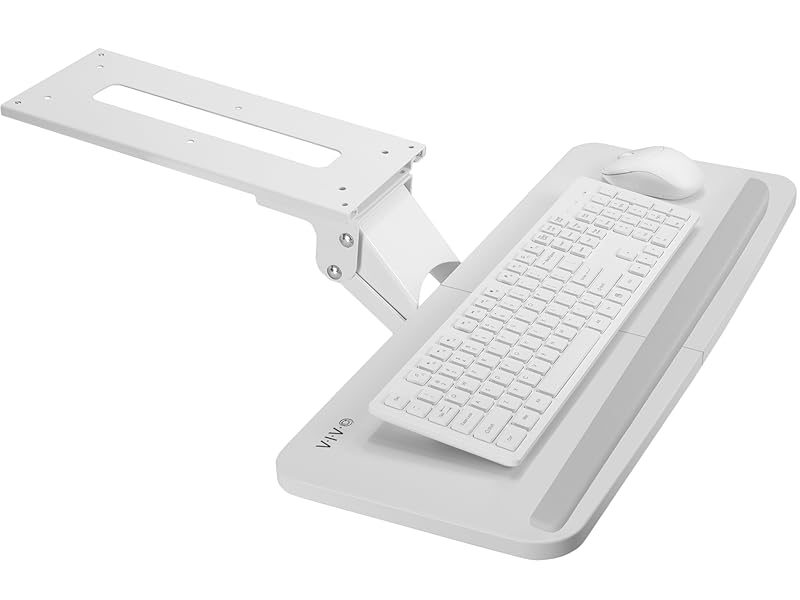 Available in multiple colors
Ergonomic Under Desk Keyboard Tray Mount
Enhance your typing posture while using our under-desk keyboard and mouse tray mount. An adjustable and convenient workflow is far more ideal and easy on the body as you type at a more ergonomic position. When not in use, simply slide the tray under the desk and out of the way. Getting your keyboard tray set up is a breeze, and we provide all the mounting hardware for under-desk mounting.


 Enhance Posture
Extensive flexibility of tray placement provides comfortable typing angles
 Under Desk
All mounting hardware is included for fast and easy assembly.
 Smooth Track
Push the tray underneath the desk when not in use for space efficiency
 Comfortable Typing
Gel wrist padding for ultimate comfort.
1 SIZE & COLORS
2 ERGONOMIC
3 MOUNTING
4 HIDE AWAY
5 WRIST PAD
Specifications & Compatibility
Keyboard Compatibility: Fits most keyboards and mice on the market Minimum Desktop Thickness: 5/8″ Weight Capacity: 4.4 lbs Material: Particle Board, Steel Keyboard Tray Dimensions: 25″ – 25” x 10” Sliding Track Dimensions: 14.25” x 6.25” Height Adjustment: 5” Tilt: +6° to -22° Rotation: 360°
Other VIVO Keyboard Trays
Add to Cart
Add to Cart
Add to Cart
Add to Cart
Add to Cart
Customer Reviews
4.1 out of 5 stars 2,586
4.5 out of 5 stars 33
4.1 out of 5 stars 546
4.4 out of 5 stars 12,187
4.2 out of 5 stars 1,562
Price
$59.99$59.99
$89.99$89.99
$69.99$69.99
$49.99$49.99
$69.99$69.99
Mount Type
Under Desk Mount
Under Desk Mount
Under Desk Mount
Clamp On
Clamp On
Height Adjustment Range
0″ – 5″
0″ – 5″
0″ – 5″
–
0″ – 2.4”
Tray Demensions
25″ x 10″
25″ x 10″
25″ x 10″
26.8” x 11”
26.8” x 11”
Weight Capacity
4.4 lbs
4.4 lbs
4.4 lbs
11 lbs
11 lbs
# Of Available Colors
5
1
1
5
4
Ergonomic Keyboard and Mouse Tray: Installs underneath a standard desk for comfortable typing angles –Patent Pending–
Compatibility: If installing to a height adjustable desk, you will need a spacer bracket for the track to fit over the frame crossbar. Search for adapter MOUNT-SPACER01 (not included) for this purpose
Deluxe Universal 25″ x 10″ Tray: Fits most keyboards and mice. The keyboard slides forward and back on a 14.25″ long and 6.25″ wide track (will need 14.25″ between the desktop edge and crossbar). Minimum recommended desktop thickness is 5/8″
Enhance Posture: Reduce wrist soreness with supportive rubber padding, full side to side rotations, and 5″ height adjustment
Simple Assembly Process: All mounting hardware is included for fast and easy assembly. The total tray weight is 10 lbs. Please be sure your desk can support this under-mounted weight







Bennett Smith –
Check clearance front of desktop to crossbar of base. Minimum 30″ deep desk, any width ok
Also make sure there is the necessary 14.25″ from front of desk to the desk crossbar as in the product illustrations. I ended up ordering a larger 30″ deep desktop to make this happen [had a 24″ desktop and would not fit but also found that the 24″ by 48″ was too shallow for my needs. So I spend twice on a desktop. BAD MOVE]This VIVO keyboard is just what I needed. used with the undermount CPU rack. PLAN, plan the layout before screwing to desktop. First Make sure CPU access is not impeded by the desk control panel.Then when CPU mount is decided, make sure the keyboard tray clears the CPU under the desk so the drawer can close fully.Also the drawer was difficult to slide in and out. Use a silicone spray to lubricate and works much better but does not glide easily.I did not like the rubber stop provided for the bottom and could not find a mouisepad that didn’t slip off.I purchased a large piece of PU Leather. Cut it to size. Then used 3M Super 77 Multi-Surface Spray Adhesive and glued the PU leather to the keyboard tray.Now a soft surface that works great for a mouse pad and istn’t as slippery as the material on the original tray.
PGP –
Good quality and works well.
The price is good for the quality. Took 5 minutes to install and after foregoing the supplied gel wrist wrest which may compete for the space needed by a keyboard that has one built-in, the melamine coated wooden board/tray is a good size. It will just fit a large keyboard and a mouse. The mechanism is easy enough to adjust and allows a lot of tilt closest-edge-down and a small amount of tilt the other way. All in all the range of slope seems to be generous enough. Adjustment is assisted by a spring so it doesn’t just flop when loosened. After tightening it into position it stays where it is. There is still some give in all the joints if you bump the tray but it all settles back to where you set it originally – its not a robotic arm lined with precision bearings and manipulated by hydraulics after all. Tray slides out easily enough to click into a semi-locked position when fully extended. Table surface can be swivelled left and right freely (can’t be locked into place) but has the right amount of resistance to make it sturdy. The whole thing takes a fair amount of weight, I can rest my forearms on it but of course it will flex a little. Obviously you can’t sit on it or use it as a baby-change table but if the cat jumps up on it, it should survive. I type at 100wpm and use a kinesis (freestyle2) split keyboard to combat RSI so getting into the right seating position is critical to my work, this particular tray table seems perfect for that.
Kenneth G. Peters –
Good product, but plan before installing
This drawer is well designed. The desk on which I installed it has a one inch high and one inch deep lip along the front. The curved arm that holds the tray is able to get around that. I had ordered the spacers but did not need them.Because the drawer is suspended on an arm, there is a little bit of vibration as you type. It does not feel as solid as the surface of a desk, but it is good enough. The height adjustability is good.Installation is not difficult — six screws into the underside of the desk. You will need to drill pilot holes for the screws. The hardware provided is good.One tip: do some thinking before you install it. The tray is wide enough to hold my Apple keyboard with a mousepad next to it on the right. Key thing to remember: if that is the layout, the center of the keyboard is not in the center of the tray and therefore is not lined up with the arm and mounting bracket; it is to the left of them. If you want the center of the keyboard to line up with the center of your monitor, you must either (a) move the monitor to the left and sit a bit to the left of the center of the tray or (b) install the mounting bracket to the right of the center of the monitor. Measure and plan carefully.
Dan B. –
Solid but a little sticky to shift
I received this recently and installed it in about 20 minutes. The directions are simply pictures and easy to follow.The mount is heavy and solid. It is metal. The actual tray is also solid and feels like black coated wood; not simply painted but dipped and fully coated. Mine did come with a scratch in the face which is annoying but my keyboard covers the gouge so it is not that big a deal.It comes with 10 small screws and matching washers. As per the directions, you will need to mount the tray to the support and then the entire thing to the underside of the desk. It is relatively easy but two of the screws did strip both when attaching the tray and when attaching the entire thing under the desk. This is a little concerning to the life of the tray, and the vibration it will have over time. Regardless it seems to be a solid install and I hope it remains this way. Time will tell as I pull this out and push it in a ton throughout the days.I was limited on the underside of my desk due to a fixed bracket, but the support does fit well and the tray is able to rotate fully from left to right as needed. With the tray fully pushed back into itself you need just over 17.5″ for the tray to be fully under the desk. As I type there is minimal vibration and you are able to adjust the position of the tray pretty easily and with use of a single clamp you will need to turn manually any time you want to adjust it.I have a desk that is both traditional and can raise to be a standing desk. When standing this tray is great. When sitting you definitely have leg room and clearance. You will need about 5.75″ clearance from the top of your knee/thigh to the underside of the desk to clear this tray.My only issue is that it does not push in or pull out very smoothly. The tray slides along two guides and they appear to be made of plastic and do not move easily. I wish they used ball bearings but oh well. To help I have to lift the front of the tray each time I want to adjust it and this allows the guides to move a little easier. Without lifting first it sticks a lot. A whole lot. I am currently weighing out how much of a drawback this is to determine if I keep the tray.Lastly, be aware of the two screws in the front of the metal support bracket. They are there to prevent you from pulling the tray out completely from the support. They act like front bumpers. A good idea however they hang lower than the support and you need to watch out for them scratching the face of your keyboard like they did mine. This is irritating since the keyboard is brand new but now has a big, long scratch from the bumper screws of the tray. Just be sure to have the keyboard positioned a little lower and avoid my mistake. And position it low enough to accommodate for the slight lift needed to slide the tray in and out as well.Overall a solid and helpful tray with lots of adjustability. Low vibration and a good size. I can have both the keyboard and mouse on the tray if needed. I’m just not sure if I am OK with having to lift the front to adjust each time I want to use it…Hope this helps.
Juan Manuel –
Buen equipo y rápido en su entrega
Carolf –
Práctica y sencilla de instalar. La tenemos hace más de un año y está como el primer día. Lo que no vimos tan necesario fue la almohadilla para apoyar las muñecas.
Wildtrog –
Supplied unassembled so need to use the wrist rest if your keyboard has one built-in. I used self sticking velcro strips to hold the keyboard in place as it has a wrist rest and is larger than many keyboards. Adding some silicone grease to the runners makes for a smoother action moving the keyboard
Tran Hieu –
Der VIVO Tastaturauszug ist sehr stabil und gut verarbeitet. Tastatur und Maus haben ausreichend Platz, der Auszug läuft leicht und verbessert die Ergonomie deutlich. Die Montage erfolgt ohne Bohren oder Schrauben in den Schreibtisch.
Nuala Kearns –
I bought 2 cheaper versions before buying this one and they had to be sent back. I love that there is no clamps on the desk. Lots of different positioning options and so easy to manoeuvre.One tip… I put the fixing unit flush with the edge of the desk, I would put it an inch or more back to allow the tray to be slid completely back under the desk. It comes out so far so you are not losing anything by fixing a little further from the edge and it would then be tidied away completely.Really good quality. Very happy!