







Product description

C-Clamp Mount System
Under Desk Mounted Keyboard Tray
Free up desktop space and enjoy a more comfortable typing experience with this under-desk keyboard tray. Designed to hold your keyboard, mouse, and more below the desk surface, it helps create a clean, efficient workspace. Smooth sliding motion and ergonomic angles reduce wrist and shoulder strain, while sturdy C-clamps ensure easy, damage-free installation.

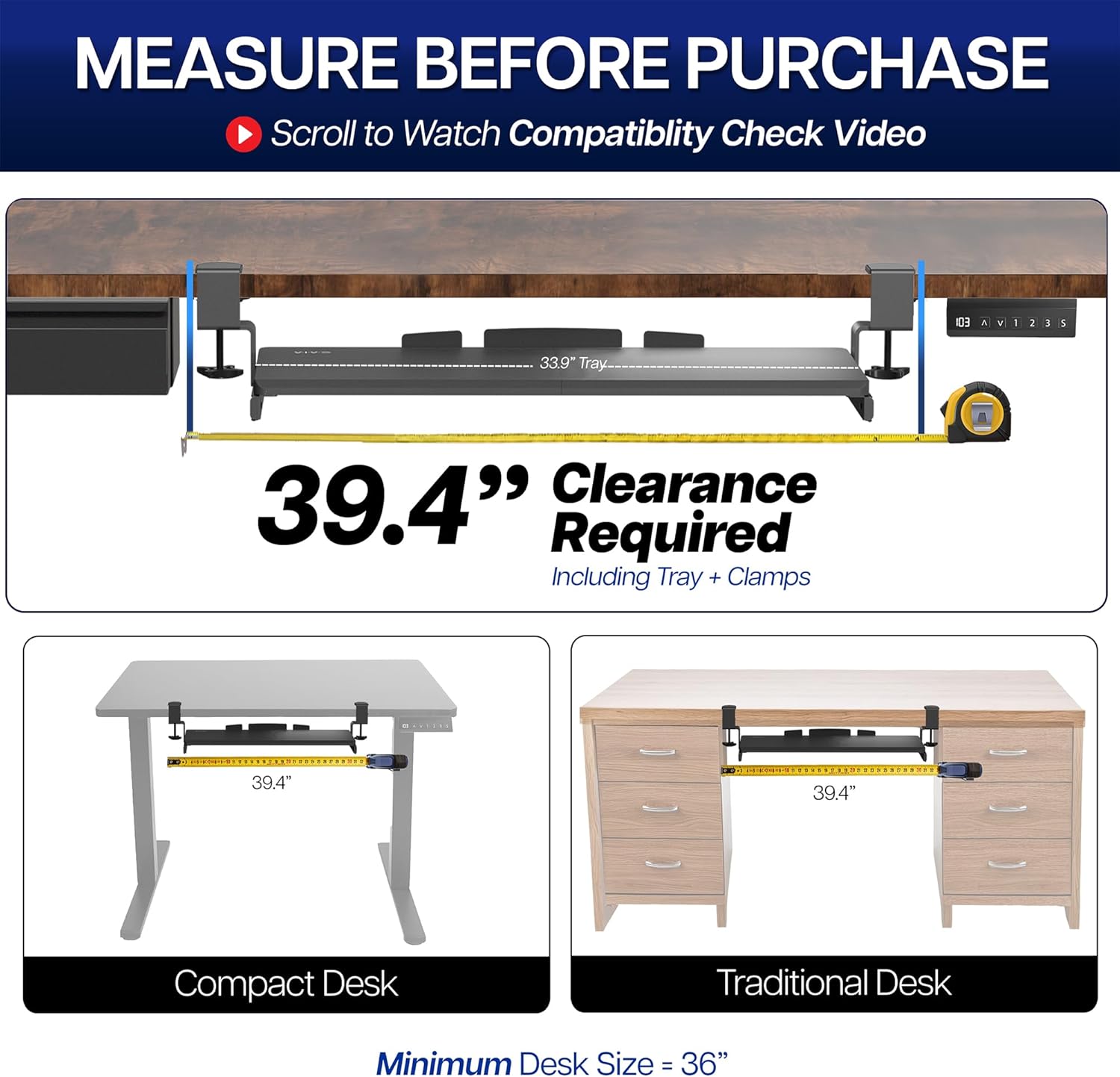
MEASURE BEFORE PURCHASE
The video showcases the product in use.The video guides you through product setup.The video compares multiple products.The video shows the product being unpacked. measuring under desk compatibility Merchant Video

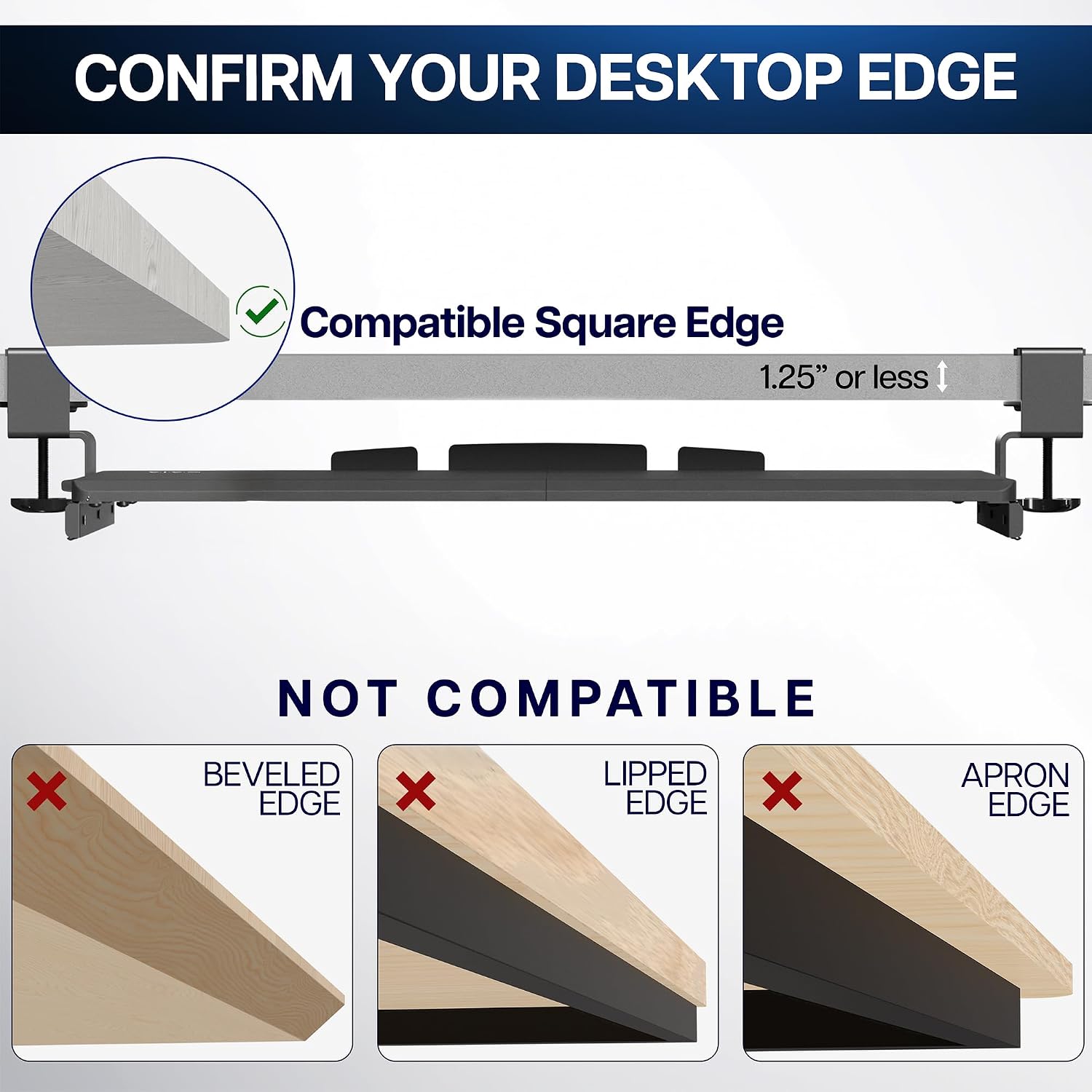
*** PLEASE CHECK DESKTOP COMPATIBILITY ***  No Beveled Edges
Desktop needs to have a level underside for clamps to fully secure.
 No Crossbar/Under Desk Support
Desktop should be clear of crossbars or other supports in the intended clamp installation location.
 No Raised Edges
A level desktop is required for clamps to secure properly.
 Correct Edge
A clean square edge with a smooth upper & lower surface.

 Increase Work Space
Holds your keyboard, mouse, and other small accessories below the desktop for added work space.

Slides under 12.5″
Smooth Gliding Tracks
Smooth gliding tracks extend tray 8.5″ from desk & allow for easy under desk storage when not in use
 Comfortable Typing
enjoy ergonomic typing angles that relieve stress on your wrists and shoulders.
1 COMPARISON
2 SAVE DESK SPACE
3 EASY STORAGE
4 COMFORTABLE TYPING
Variations & Colors Available


Extra Long Tray: This 33.9″ (39.4″ including clamps) x 11″ under-desk keyboard tray holds your keyboard, mouse, and other small accessories below the desktop for added work space and holds up to 11 lbs –Patent Pending–
Comfortable Typing Angles: Easily slide the tray in and out and enjoy ergonomic typing angles that relieve stress on your wrists and shoulders. The tray extends a maximum of 8.5” from the edge of your desk
Compatibility: Before purchasing, please make sure that your desk surface does not exceed a thickness of 1.25″. Note the tray’s total length from clamp to clamp is 39.4″, so please make sure you have that much space on your desk before purchasing
Sturdy C-Clamps: Attach the keyboard tray to your workstation without causing any damage to your desk (1.25” maximum desk thickness) with solid C-clamps that hold everything tightly in place and are easily adjustable for user convenience
Easy Installation: All hardware and instructions are provided for assembly, and mounting your keyboard tray to the desk is an easy process with the adjustable clamps. Please Note: This tray is not compatible with desktops that have beveled edges


KRB Austin, TX –
Great keyboard and OUTSTANDING customer service
Summary:This is a great keyboard. It arrived on time and was well packaged. It’s easy to assemble and clamp onto your desktop. The instructions are clear, the parts are solid — real metal hardware and no cheap plastic parts. It’s steady when you type; no wobbling even if you type fast. The tray is wide enough and deep enough to store my giant ergonomic keyboard and my mouse with a bit of room to spare. And it glides smoothly to store underneath your desktop. Or at least it does now … which brings me to the reason I was prompted to write a review. VIVO’s customer service is outstanding! Quite possibly the best company I’ve dealt with online or off.My excellent experience with VIVO:After carefully assembling the keyboard tray and attaching it to my desktop, the clamp on the right side seemed slightly off. No matter what I tried — re-assembling that side, adjusting the tension — the position of the clamp put the keyboard tray in a little bit of a bind on one side. The tray still worked technically, but was annoying. One side would slide in easily and the other lagged behind and had to be pushed a bit. I contacted the company through Amazon and got an immediate response.Based on the images I sent (which focused on the misaligned part of the clamp, but didn’t show the entire clamp) they thought the issue was the slider rail. They offered me the option of returning the entire keyboard or receiving a replacement slider rail. I didn’t want to be without the keyboard tray, since it was making a big difference in my hands/wrists/arms, so I asked for a replacement slider, which they promptly sent (and which also arrived quickly and was very well packaged).In the process of putting the new replacement rail on, I realized the issue was definitely not the rail, but was most definitely the clamp. One of the two pre-drilled holes in the clamp was about 1/8 inch off, meaning the keyboard was still sticking on the right side even with the new sliding mechanism. I reached out to the company again about the misaligned holes (this time with an image that showed the entire clamp). They promptly supplied a replacement clamp, which fixed the issue completely.The entire process was fast. The emails were prompt, courteous, and clear. And VIVO was willing to keep at it until the issue was fixed. Highly recommend this product and company based on this interaction.
Amazon Simp –
Worth the money
Very solid, good craftsmanship, and decent quality control. Super easy to assemble, very white — even more so than my desk.My only issue is that pulling or pushing the tray at one of the ends shears it a little and wobbles it side to side basically.Update:I was having issues where the keyboard would tilt on three different angles depending how far it was pulled out (-2, 0, +2 degrees). If you have this issue, tighten the screws all the way! Well, I did, but then it the keyboard wouldn’t fully go all the way in or come all the way out. I contacted support, they send me new rails, then I changed them out and tightened everything as much as I could and it’s great!Only issue is you have to push it in from the middle or with two hands since it can awkwardly shear a little and it’s kind of tough to move, but great overall!
Ole –
Solidly built
Easy to install, easy to use. It is quite nice, I just wish those model had a tad more flexibility to it. It is very rigid by design but I wish I could move it a little more. For the price you can’t beat it. Keyboard and mouse sit perfectly on it and works great standing or sitting. Highly recommend it if you are looking for a budget option!
Kendoso –
VERY Sturdy, largest tray available, HIGH QUALITY – But make sure you MEASURE!!!
Update January 2022Tray is great but if you’re like my wife who likes to rest her elbows on the tray… over time the (4) M4 screws that attach the sliding rails to the tray will strip. This will cause the whole tray to fall and can be quite dangerous. This happened at least 3 times until the screws were useless.I was on the verge of buying another tray when I decided to see if I can replace the screws. For less than a $1, I replaced the M4 screws with longer M4-0.7 x 8mm. You can get this at your local big box hardware store. I also recommend adding a dap of locktite on the screws as well to avoid them loosening on their own.This made the tray extremely sturdy without jamming up the slide. M4-0.7 x 10mm would be too long. So stick to the 8mm. I believe the original M4 were only 5mm.Highly recommend everyone to do this to make the tray more sturdy and safe. Wife is happy again! CHEERS!**********************WFH, my wife works at the dining table which isn’t the best for ergonomics. After awhile her wrists/hands were hurting because the table, where her keyboard was, was too high. A keyboard tray would be the solution but since it’s a dining table there were challenges to overcome and I got lucky with all the measurements.As a keyboard tray it’s probably the best and largest one out there for an edge mounted configuration. I needed one to fit both a full 10-key size keyboard AND enough room for a mouse. This was the ONLY one that fit the need. The mounting hardware is very solid, heavy duty metal. For the parts that come in contact with the table, it comes with rubber pads for protection. It’s sturdy enough to put some weight on, like if you wanted to rest your elbow on it.I’m going to provide some key specs that I couldn’t find but is very important to know if it this will work for you:- The first is understanding the limit of how thick the table can be to use this. The max spec stated for this product is that it can support up to 1.75″ thickness. I can safely say that it’s an exact number. My dining table is exactly that thick. The mounting hardware will fit this thickness but it will be a bit tight, +/- 1/8″ tolerance. So if your table is greater than 1.75″ then this will not work for you as the mounting hardware will not fit.- Next is understanding the required depth from the edge of the table where you must have a flat surface underneath the table to clamp the bottom pressure plate to. The mounting hardware is attached via a clamp style mechanism. There is a metal plate at the bottom attached to a screw handle. You tighten this so it “clamps” to your table. This is important to note especially if your table has a recessed, beveled edge that curves underneath vs. a squared edge. Also sometimes, certain desk and tables have support hardware underneath that may interfere with the mounting point. My dining table had a recessed, beveled edge and it was questionable whether I’d have a solid flat surface to clamp to. PLEASE NOTE: FROM 1.5″ in from the edge of the table, you must have a flat surface underneath the table to clamp on to. If 1.5″ in from the edge of your table, the surface is curved, angled, or exceeds 1.75″ in thickness, then you have no way to mount the hardware. 1.5″ from the edge of the table is where the center of the screw plate.- Next is the amount of clearance you will have IF you have a 1.75″ thick table. If you’re pushing the max limit in table thickness, you are giving up clearance that may or may not allow you to retract the keyboard under the table when you’re not using it. For me, I’m at the max thickness and as a result I only have 1.5″ from the surface of the keyboard try to the bottom of my table. This means, my keyboard AND mouse cannot be taller than 1.5″ in height. My wife uses a thin Logitech wireless keyboard that just meets this height but her MX Master 2 is too tall. As a result, while she has a keyboard tray she can use, she cannot retract it underneath the table. It was still worth using to be pain free. Since we’re going to be in this WFH situation for the long haul, the need to tuck your keyboard away is trivial. I also should mention that if you have a ergo keyboard and it’s important for you to store it underneath your table, it’s highly this won’t work for you. You need to have massive clearance for those keyboards.- Lastly, the one tip I have is some people have mentioned the keyboard seems to not stay in place if retracted all the way in or all the way out. I have the latter where the tray on the left side, for some reason, doesn’t extend all the way out whereas the right side does. It turns out this is due to the mounting hardware on the side that has the issue being a bit rotated. All you need to do is rotate/twist the mounting hardware a bit to resolve the retraction/extension issue. Sometimes, what happens is my wife’s chair will hit the tray and cause the mounting hardware to rotate a bit, which cause some warping or deflection of the keyboard tray tracks, which leads to the issue. The other problem could be that your flat surface is not leveled such that your mounting hardware are at different heights ever so slightly. Ultimately, the keyboard tray tracks need to be as leveled and parallel to each other as possible.I highly recommend if it works for your specifications.
Jerry –
Pick this one!
This is very well constructed – heavy duty, and looks nice as well.Easy to put together. I was able to attach it to my metal rack shelving by adding a couple 3″x3″ metal shims to give it something to hold on to in the clamps. Works great. Definitely the best choice for these.
Graham Brown –
Perfect size to attach to desk to put large midi keyboard on.Added the extenders which has worked perfectly
Krysta D’Souza –
Needed this for my 49 key MIDI keyboard and it’s the perfect fit, except for the height which I bought the height extender from the same brand for. So happy!
cbaw –
high quality material. sturdy. keyboard surface finish is perfect for mouse to glide. the higher price, compared to other variations in the market, justifies for the quality. personal recommendation to buy.
Marina –
Bandeja para teclado, funcional, ergonômica, sem furos, de fácil montagem, discreta e bonita. Recomendo.
Perlova –
A well built product at a decent price. The keyboard drawer arrived in a sturdy box and was well packed. The assembly instructions were clear and everything well labelled. The parts all went together accurately and quickly. It fit onto my desk perfectly and securely. The slide works well and moves easily. Plenty of room for a large keyboard and a place for a mouse pad. Great product.