


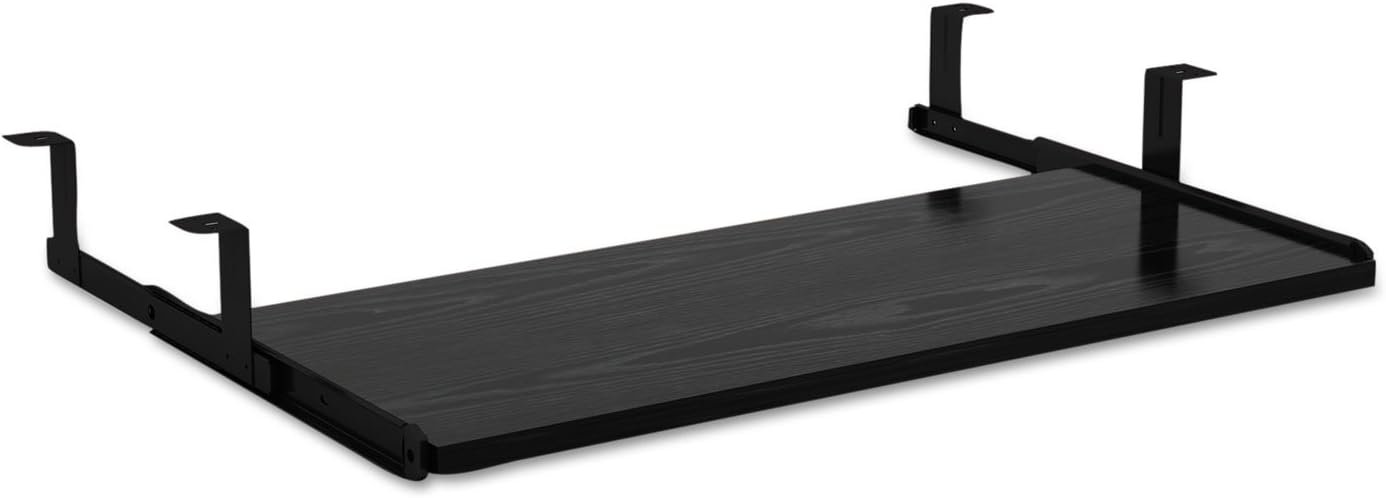
Attaches below worksurface and holds standard size keyboard. 3/4″ thick. Color: Black; Workstation Type: Straight; Keyboard Tray Dimensions (W x D): Overall width is 31.10”, overall depth is 13.98 (retracted) – 23.03” (extended) and overall height is 3.94”
Attaches below worksurface for a clean look.
Holds standard size keyboard and mouse.
Compatible with Alera Valencia series desks.
0.75″ thick and slides in and out as needed.
Back to products

VASAGLE File Cabinet, Filing Cabinet with 2 File Drawers, Printer Stand, Fit A4, Letter Size, Hanging File Folders, Modern Farmhouse Style, for Home Office, Honey Brown UOFC048T41
Original price was: $89.99.$76.48Current price is: $76.48.





Steven –
This is a good keyboard tray
I am impressed by this keyboard tray. It is sturdily built and easy to install. It has plenty of room for both a full size keyboard with number pad, and a mouse fits easily off to the side.The suspension legs that attach it to the underside of a desk are about an inch longer than they need to be, but it’s not a big deal unless you have a high profile drawer desk such as mine. The drawers in my computer desk are about four inches high, and that makes the keyboard tray hang down about three inches more than I would prefer. But I knew that would be the case when I bought the tray.Overall, it is a good value and works pretty well for my application.
IA –
Great space for keyboard and mouse
Nice and spacious. Easily fits my full size keyboard and wrist rest as well as my mouse pad. Low profile doesn’t take up too much space under the desk. Very subtly locks into place when you pull it out all the way, so you don’t accidentally bump it back under the desk with the slightest move.I installed it while my desk was upright, which wasn’t too bad, you just have to make sure you measure where you want it to go. It’s certainly easier with help.There is no lip on the back of the tray, so it is possible to push your items off the back if you’re not careful. This is not a problem for keyboards (my keyboard is about 4 inches away from the back) but might be a problem for loose papers.These are not the product’s fault, but they are things to be aware of:- Make sure the screws aren’t too long for the thickness of your desk!- Take note if your desk has a lip on the edge- it will affect what can fit under the desk.
Dr. J Moulton –
Excellent, sturdy keyboard tray with one small flaw.
Sturdy, well-made keyboard tray. Plenty of room for a large keyboard and mouse. The most stable of several different kinds we have installed. The finish is excellent as are the ball-bearing slides. Clearance is enough even for an arched Microsoft ergonomic keyboard up on its front legs. The only flaw is that the mechanism to hold it in the open position is not strong enough. We use a very small C-clamp to hold it position. If this is a problem for you, you can also use a wedge, or a screw to hold the tray in place. Or maybe removing the end caps, sliding out the rails would allow access to the mechanism which might be modifiable. We only occasionally need to slide the keyboard under the counter so loosening the clamp each time is not a problem. If you need to frequently slide your keyboard holder in and out, maybe this one is not for you unless you can modify it. And yes, it can be fastened under a counter or table that cannot be inverted. An assistant can hold it in place, or large C-clamps or an inverted wastebasket and some piled books will hold it in place if you have to do the job solo.
Blazing Pascal –
Took a chance. It works!
I wasn’t sure if this would fit under my desk, but after reading some reviews and answers that might go either way, and not finding anything at all that I liked that would clearly work better, I decided to give it a try. It works!One person in an answer very helpfully suggested a depth of about 15″ just to play it safe. I only have 13 7/8″ of depth. I totally understand why 15″ was suggested, as my tray is about as flush with the front of my desk as it can be, however, I don’t mind the location. I don’t even feel or notice it unless I really let my gut hang out, but hey, that’ll just be another good reminder that I need to get my butt out of the chair and lose some weight!As I said, I have 13 7/8″ of depth to work with. I mounted the rails as far back as I could given the space and once installed the depth of the keyboard tray is at most 14 1/8″ from the back, an almost imperceptible difference. So, if you have 13.5″ (to round down) of depth and don’t mind the tray coming right up close to the edge of your desktop, then this will work for you.Installation was very simple. It comes with eight identical screws and I was able to sink them fully into my IKEA Bekant desktop (~5/8″ thick) which I have mounted on an Uplift adjustable height desk frame. I managed to do it by myself WITHOUT flipping the desk over. I mounted the brackets to the tray, then carefully held the whole thing up under the desk while I marked the drill holes. I just barely drilled pilots and held it up while I screwed it in (back left, front right, back right, front left, like tightening a wheel onto a car). Something soft to lie down on helps. :)Other measurements you may be interested in include how far it hangs down. Once mounted, the bottom of the tray hangs down 3 1/2″. The rail brackets on either side hang down 3 7/8″.Also, I have a Corsair K70 LUX RGB keyboard which, while I have always just used it on the desktop, fits pretty well on the tray, leaving a comfortable 8.5″+ of mouse space when you’re gaming (WASD, with the keyboard slightly off to the left). That’s a pretty big keyboard with a 10-key, and even when I use it on the tray for general typing/internet stuff (keyboard more centered), I can use the mouse comfortably. Of course, mouse usage will vary based on style and cursor sensitivity settings, etc.I started out looking for a simple under desk tray to store my wireless Apple keyboard (I’m using both my MacBook Pro and Windows PC on the same desk/monitor). When I saw this I gave it a try and it works great! I’ve attached a couple of pictures just to give you an idea of what it looks like.Hope this helps someone!UPDATE: Just wanted to add that I ordered a mouse pad that fits the entire tray perfectly. It currently goes by the catchy title of “Cmhoo Extended Mouse Pad 27 inches Large Mouse Pad Thick Mouse Mat Gaming Functional Non-slip Rubber Base (27.6×11.8×0.2in, Thicker Black Edge).” Basically, I’ve found that anything listed as 28×12 should work as they are actually just a tiny bit smaller (27.6×11.8 in this case). Anyways, the pad is working great and might be a good addition to your set-up.
Bill –
Works well
The price was good and it is easy to install. It is everything you would expect from a $26 keyboard drawer. It is not the most sturdy but it is sturdy enough. The hardware included is sufficient. I read some of the reviews lower than 4 stars and the complaints feel grossly exaggerated
Sdd R –
Great!
This keyboard and mouse pull-out has very sturdy hardware and a nice black finish to the wood. I was very impressed with the quality and I’m very glad I purchased this. I have more room on my desktop, and this lines up nicely with my chair armrest for a more comfortable work experience.
mariah mcdonald –
Receiving a smaller one?
Very nice shelf but doesn’t fit my desk, its too long
Longcat90 –
Great
Good quality, carefully packaged. Works great. Only thing I’d change is that it would be great if there was a lip on the back surface, so if you slide your keyboard back too far, it won’t fall off from the back.